准备环境变量
在上层服务端配置网关地址和 App Token,不要放到前端、移动端、浏览器存储或公开仓库。
API_GATEWAY_BASE_URL=https://common-server-gateway-backend-230591-5-1404418380.sh.run.tcloudbase.com
API_GATEWAY_APP_TOKEN=<app_token>common-server-gateway
为 closet 等上层应用提供稳定的短信、天气等能力接口,把供应商切换、密钥、签名、错误归一和调用日志留在网关层。
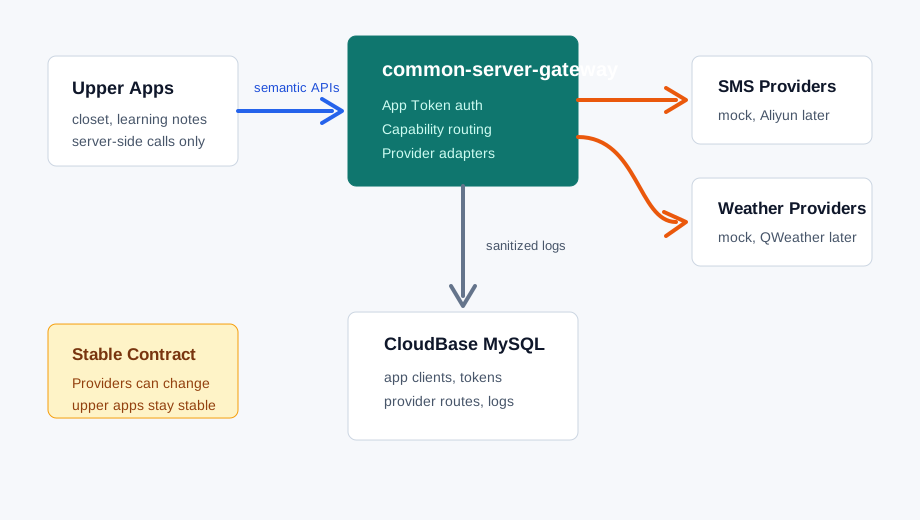
Upper App Guide
上层应用只需要接入这里列出的稳定网关 API。第三方供应商的 base URL、密钥、签名、模板、错误码和切换逻辑都留在网关内部。
在上层服务端配置网关地址和 App Token,不要放到前端、移动端、浏览器存储或公开仓库。
API_GATEWAY_BASE_URL=https://common-server-gateway-backend-230591-5-1404418380.sh.run.tcloudbase.com
API_GATEWAY_APP_TOKEN=<app_token>每个业务请求都必须带 App Token。建议同时传入上层业务请求 ID,便于跨系统排查。
Authorization: Bearer <app_token>
X-Request-ID: closet_req_20260524_001业务只调用语义化路径,不关心当前路由到 mock、真实天气供应商,还是未来的短信供应商。
POST /api/v1/sms/verification-code/send
POST /api/v1/weather/query| 环境 | Base URL | 说明 |
|---|---|---|
| CloudBase 测试 | https://common-server-gateway-backend-230591-5-1404418380.sh.run.tcloudbase.com |
当前已发布的测试网关后端。 |
| 本地 Docker | http://localhost:5110 |
本地调试时由 Docker Compose 暴露。 |
| 生产 | 尚未配置 |
生产环境启用时需要独立环境、独立数据库和独立密钥。 |
| 能力 | 方法 | 路径 | 入参位置 | 用途 |
|---|---|---|---|---|
capability.list |
GET | /api/v1/capabilities |
无 | 查看当前 App Token 已授权且启用的 capability。 |
capability.docs |
GET | /api/v1/capabilities/{capability_key}/docs |
Path | 读取指定 capability 的代码内契约、示例、curl 和 Markdown 文档。 |
sms.verification_code.send |
POST | /api/v1/sms/verification-code/send |
JSON body | 发送由上层应用生成、保存和校验的短信验证码。 |
weather.current.get |
POST | /api/v1/weather/query |
JSON body | 按经纬度获取当前天气或天气预报。 |
Authorization: Bearer <app_token>。capability_forbidden。X-Request-ID,业务侧应记录它用于排查。curl "${API_GATEWAY_BASE_URL}/api/v1/capabilities" \
-H "Authorization: Bearer ${API_GATEWAY_APP_TOKEN}" \
-H "X-Request-ID: upper_app_req_001"如果上层服务希望在发布前校验接口契约,可以读取 capability 文档端点。这个端点返回 endpoint、request location、input schema、output schema、request example、response example、curl example 和 Markdown。
curl "${API_GATEWAY_BASE_URL}/api/v1/capabilities/weather.current.get/docs" \
  -H "Authorization: Bearer ${API_GATEWAY_APP_TOKEN}"
Capabilities
当前稳定开放的 capability 契约由后端代码固定,Provider 切换不会改变上层应用看到的入参和出参结构。
POST /api/v1/sms/verification-code/send
发送由上层应用生成和校验的验证码。网关不保存原始验证码,日志只保留手机号脱敏值和 code length。
{
  "type": "object",
  "required": ["phone", "code", "scene"],
  "additionalProperties": false,
  "properties": {
    "phone": {
      "type": "string",
      "minLength": 4,
      "maxLength": 32
    },
    "code": {
      "type": "string",
      "minLength": 4,
      "maxLength": 12
    },
    "scene": {
      "type": "string",
      "minLength": 2,
      "maxLength": 80
    },
    "template_params": {
      "type": "object",
      "additionalProperties": {
        "type": "string"
      }
    }
  }
}{
"type": "object",
"required": [
"request_id",
"success",
"capability",
"provider",
"provider_request_id",
"sent_at"
],
"properties": {
"request_id": {"type": "string"},
"success": {"type": "boolean"},
"capability": {
"type": "string",
"const": "sms.verification_code.send"
},
"provider": {"type": "string"},
"provider_request_id": {"type": "string"},
"sent_at": {
"type": "string",
"format": "date-time"
}
}
}{
"request_id": "req_xxx",
"success": true,
"capability": "sms.verification_code.send",
"provider": "mock-sms",
"provider_request_id": "mock_sms_req_xxx",
"sent_at": "2026-05-22T12:00:00Z"
}POST /api/v1/weather/query
按经纬度查询当前天气或天气预报,并返回统一的 query、location、weather、observed_at 或 forecasts 字段。
{
  "type": "object",
  "required": ["latitude", "longitude", "type", "count"],
  "additionalProperties": false,
  "properties": {
    "latitude": {
      "type": "number",
      "minimum": -90,
      "maximum": 90
    },
    "longitude": {
      "type": "number",
      "minimum": -180,
      "maximum": 180
    },
    "type": {
      "type": "string",
      "enum": ["current", "hourly", "daily"]
    },
    "count": {
      "type": "integer",
      "minimum": 1,
      "maximum": 168
    }
  }
}
current 会忽略 count 并固定返回当前天气;hourly 的 count 表示未来小时数;daily 的 count 表示未来天数。高德不提供小时级天气,hourly 会按 24 小时向上换算成逐日预报天数,例如 24 小时返回 1 天,48 小时返回 2 天。
{
  "type": "object",
  "required": [
    "request_id",
    "capability",
    "provider",
    "query",
    "location"
  ],
  "properties": {
    "request_id": {"type": "string"},
    "capability": {
      "type": "string",
      "const": "weather.current.get"
    },
    "provider": {"type": "string"},
    "query": {
      "type": "object",
      "required": ["latitude", "longitude", "type", "count"],
      "properties": {
        "latitude": {"type": "number"},
        "longitude": {"type": "number"},
        "type": {"type": "string"},
        "count": {"type": "integer"}
      }
    },
    "location": {
      "type": "object",
      "properties": {
        "country": {"type": ["string", "null"]},
        "province": {"type": ["string", "null"]},
        "city": {"type": ["string", "null"]},
        "adcode": {"type": ["string", "null"]},
        "latitude": {"type": "number"},
        "longitude": {"type": "number"}
      },
      "additionalProperties": true
    },
    "weather": {
      "type": "object",
      "properties": {
        "text": {"type": ["string", "null"]},
        "temperature_c": {"type": ["number", "null"]},
        "humidity": {"type": ["number", "null"]},
        "wind_direction": {"type": ["string", "null"]},
        "wind_speed": {"type": ["string", "null"]},
        "wind_power": {"type": ["string", "null"]}
      },
      "additionalProperties": true
    },
    "observed_at": {
      "type": "string",
      "format": "date-time"
    },
    "forecasts": {"type": "array"}
  }
}{
"request_id": "req_xxx",
"capability": "weather.current.get",
"provider": "mock-weather",
"query": {
"latitude": 31.23,
"longitude": 121.47,
"type": "current",
"count": 1
},
"location": {
"country": "中国",
"province": "上海市",
"city": "上海市",
"adcode": "310000",
"latitude": 31.23,
"longitude": 121.47
},
"weather": {
"text": "晴",
"temperature_c": 24.0,
"humidity": 58,
"wind_direction": "东风",
"wind_power": "2级"
},
"observed_at": "2026-05-22T12:00:00Z"
}Examples
把示例里的 ${API_GATEWAY_BASE_URL} 和 ${API_GATEWAY_APP_TOKEN} 换成上层服务端环境变量即可。不要在浏览器控制台或前端代码中暴露真实 token。
验证码由上层应用生成、保存、过期和校验;网关只负责发送和记录脱敏日志。
curl -X POST "${API_GATEWAY_BASE_URL}/api/v1/sms/verification-code/send" \
  -H "Authorization: Bearer ${API_GATEWAY_APP_TOKEN}" \
  -H "Content-Type: application/json" \
  -H "X-Request-ID: sms_req_001" \
  -d '{
    "phone": "13800138000",
    "code": "123456",
    "scene": "closet_login",
    "template_params": {
      "product": "closet"
    }
}'只传经纬度,不传城市或 adcode。切换 type 可查当前天气、未来小时数或未来天数。
curl -X POST "${API_GATEWAY_BASE_URL}/api/v1/weather/query" \
  -H "Authorization: Bearer ${API_GATEWAY_APP_TOKEN}" \
  -H "Content-Type: application/json" \
  -H "X-Request-ID: weather_req_001" \
  -d '{
    "latitude": 31.23,
    "longitude": 121.47,
    "type": "hourly",
    "count": 48
  }'
Errors
业务侧不要只依赖 HTTP 状态码,应读取 error.code 做稳定分支,并把 request_id 写入上层日志。
所有网关业务错误都会返回统一 JSON。请求头中传入的 X-Request-ID 会原样进入响应;未传时由网关生成。
{
  "error": {
    "code": "provider_route_not_found",
    "message": "No enabled provider route exists.",
    "request_id": "req_xxx"
  }
}| HTTP | error.code | 含义 | 上层处理建议 |
|---|---|---|---|
| 401 | unauthorized |
缺少 App Token,或 token 无效、已轮换。 | 检查服务端密钥配置,避免使用旧 token。 |
| 403 | app_client_disabled |
当前应用方已被后台禁用。 | 联系网关管理员确认应用状态。 |
| 403 | capability_forbidden |
App Token 未授权调用该 capability。 | 在管理后台给应用方勾选对应能力。 |
| 404 | capability_not_available |
能力不存在、未启用或不在代码定义中。 | 检查路径和 capability key,确认网关能力已发布。 |
| 422 | invalid_request |
参数缺失或不符合约束。 | 按页面中的入参 schema 修正请求。 |
| 502 | provider_failed |
供应商调用失败,网关已做错误归一。 | 记录 request_id,必要时由网关侧排查供应商日志。 |
| 503 | provider_route_not_found |
没有启用的 provider route。 | 联系网关管理员检查 provider 和能力路由。 |
Boundary
API_GATEWAY_BASE_URL 和 API_GATEWAY_APP_TOKEN。X-Request-ID 传给网关。error.code 做业务提示、重试或降级。/api/v1/capabilities 确认 token 能看到目标能力。/api/v1/capabilities/{capability_key}/docs 校验契约。运行 MySQL + backend,本地自动迁移并初始化代码内能力和 mock provider 路由。
docker compose -f docker-compose.local.yml up --build
后端使用 backend/Dockerfile,端口 8080,健康检查 /health,生产数据库使用独立 schema。
DATABASE_URL=mysql+pymysql://...
官网说明和管理后台都放在 CloudBase 静态托管独立目录,避免和已有网站混淆。
/common-server-gateway/index.html